


Debt Snowball Spreadsheet for Google Sheets: Pay Off Debt Faster with a Clear Plan
This debt snowball spreadsheet for Google Sheets turns every balance you owe into one simple plan. List your debts, choose snowball or avalanche, and see exactly what to pay each month and the date you'll be debt-free. Tick off payments and watch your progress grow, in Google Sheets or Excel, on any device.


Why You'll Love This Debt Payoff Spreadsheet
🌟 Snowball, avalanche or custom: switch methods in one click and compare your debt-free date.
🌟 A payoff schedule that does the math: exactly what to pay on every debt, every month.
🌟 Freed-up payments roll over for you: when one debt is gone, its payment snowballs into the next.
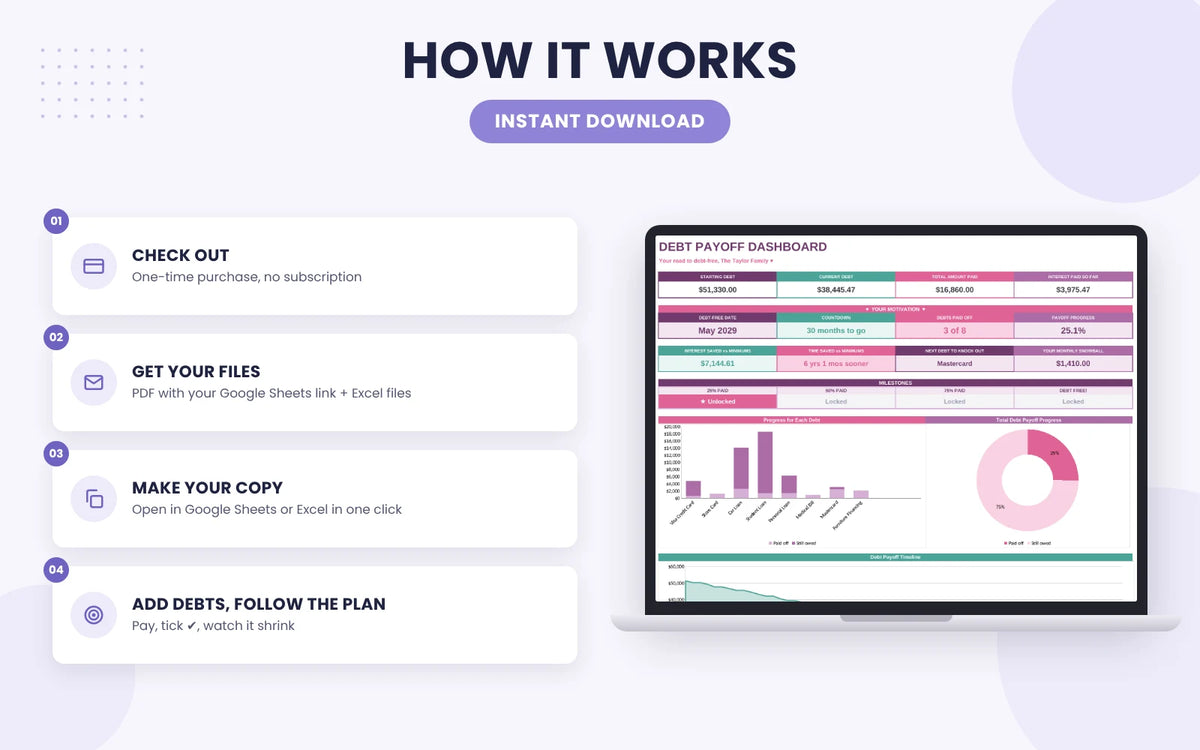
🌟 Motivation built in: countdown, milestones, interest saved and charts that move as you pay.
🌟 Up to 50 debts in Google Sheets or Excel, with 2 colour themes to choose from.
See How the Debt Snowball Spreadsheet Works

Add your debts and any extra
Type each balance, interest rate and minimum payment. Add what extra you can pay and your debt-free date updates instantly.

Pick snowball or avalanche
Switch methods from the dropdown and see every payoff date change, so you can choose the plan that fits you.

Watch your debt shrink
Tick each payment and your dashboard shows your countdown, milestones, interest saved and falling balances.
A debt snowball calculator spreadsheet that plans for you
Enter each balance, interest rate and minimum payment once. The spreadsheet ranks your debts and builds the plan.
- Smallest balance first, highest rate first or your own order
- Payoff month and interest for every debt
- Compare methods in one click
Know exactly what to pay each month
Your debt payoff spreadsheet shows the payment for every debt, month by month, until the last balance hits zero.
- Tick ✔ each payment and balances update
- Pay more or less in any month with +/-
- Log tax refunds and bonuses as extra payments
Watch your debt shrink
Every payment you tick moves your dashboard forward, so you can see the progress that keeps you going.
- Debt-free date and months-to-go countdown
- Interest and time saved vs minimum payments
- Milestones at 25%, 50%, 75% and debt free
Pick the look you love
Both versions are included, with the same formulas and dashboard.
- Pink & purple
- Blue & green
- Change your mind any time
Google Sheets or Excel, anywhere
Use the debt payoff spreadsheet in Google Sheets, free with your Google account, or in Microsoft Excel.
- Computer, phone and tablet
- No app or subscription needed
- Your data stays in your own Drive or computer
Why Every Couple, Single Mom and Married Family Should Use This Debt Calculator Payoff Spreadsheet
Debt feels heavier when you can't see the end of it. This debt calculator payoff spreadsheet shows you the end: the exact month every balance hits zero, and what to pay to get there.
💜 Couples and newlyweds: put every card and loan from both of you in one shared Google Sheet. You agree on one plan, see the same numbers and stop arguing about which debt comes first.
💜 Single moms: when every dollar is already spoken for, guessing is expensive. The sheet tells you exactly what to pay each month, and even a small extra like $50 moves your debt-free date closer.
💜 Married families: car loans, student loans, credit cards and medical bills all in one place. Watch the countdown drop together and celebrate each milestone as a family.
Whoever you are, the math is already done. You only type in what you owe, and the debt calculator payoff spreadsheet builds the plan for you.
Stop guessing which debt to pay next and start seeing real progress every month. Your debt-free date starts here! 💜
More Budget Templates from ARKEONIC
Monthly Budget Spreadsheet for Google Sheets
Plan, track and save every month with budget vs actual, bills, savings goals and net worth in one Google Sheet.
See the Monthly Budget SpreadsheetBudget Sheet Template for Google Sheets
A simple budget planner with 12 monthly tabs and a year overview. Great for expected vs actual tracking.
See the Budget Sheet TemplateDebt Snowball Spreadsheet FAQ
What You'll Receive
- PDF access guide with your link to copy the spreadsheet into your Google account, plus the Excel files
- Start Here tab: 4 quick steps, colour key and how to clear the example
- Setup: up to 50 debts, payoff method, start month and extra monthly payment
- Payoff Schedule: month-by-month payments for every debt, payoff dates and ✔ ticks
- Extra Payments log: tax refunds, bonuses and side-hustle money applied to the debt you choose
- Dashboard: starting and current debt, total paid, debt-free date and countdown
- Motivation cards: interest and time saved vs minimum payments, next debt to knock out
- Milestones: 25%, 50%, 75% and debt free
- Charts: progress for each debt, payoff donut, balance timeline and interest comparison
- 2 colour themes: pink & purple and blue & green
- Example data so you can see how everything works before you start
How do I access my debt snowball spreadsheet?
Right after checkout you'll receive an email with your PDF. Click the link inside to make your copy in Google Sheets, or open the Excel file on your computer, and start your plan in minutes. This is a digital product; nothing physical will ship.
Does it work in Google Sheets and Excel?
Yes. Use it in Google Sheets, which is free with a Google account, on your computer, phone or tablet, or open the Excel file in Microsoft Excel. It is not made for Apple Numbers.
Snowball or avalanche: which method should I use?
The debt snowball pays your smallest balance first for quick wins that keep you motivated. The debt avalanche pays the highest interest rate first to save the most money. Pick either one, or set your own custom order, and compare your debt-free date in one click.
Do I need spreadsheet skills?
Not at all. Every formula is already built in. You only type your debts and pick from dropdowns; the payoff schedule, dashboard and charts do the rest.
How many debts can I track?
Up to 50 debts in one debt payoff spreadsheet: credit cards, car loans, student loans, personal loans, medical bills, buy now pay later and more.
Which budget template is right for me?
Choose this Debt Snowball Spreadsheet for Google Sheets if your goal is paying off debt with a clear month-by-month plan. Want to budget every category too? Try the Monthly Budget Spreadsheet for Google Sheets. Want something simple? Get the Budget Sheet Template for Google Sheets.
What if it's not right for me?
You're covered by our 7-day money-back guarantee. Just reply to your order email.
This spreadsheet is a planning tool for informational purposes only and is not personalized financial advice. Payoff dates are estimates based on the numbers you enter.